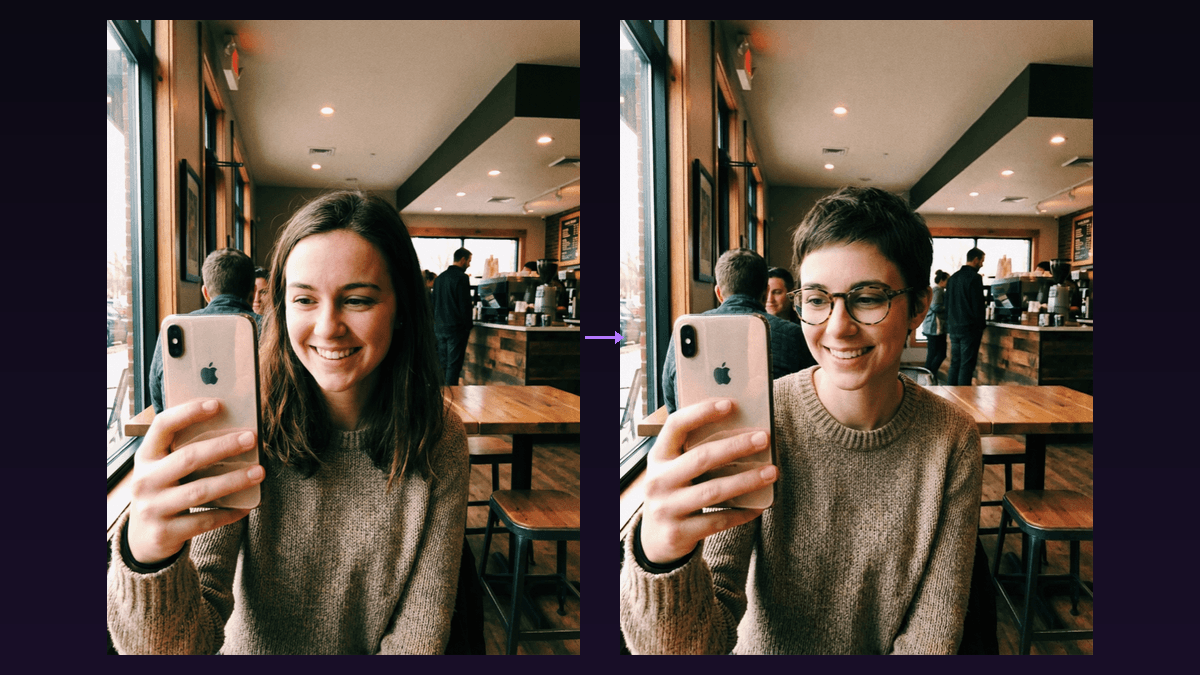

AI face swap has completely changed what's possible with a selfie and a few clicks. In 2026, the technology is good enough that you can take an everyday photo of yourself, swap your face onto a model-quality body in a magazine-worthy setting, and get results that genuinely look real. No Photoshop skills needed. No expensive studio shoots.
The most popular use case right now? Taking a regular photo and upgrading it, swapping your face onto someone with stunning bone structure, perfect lighting, and a cinematic backdrop. Think "what would I look like as a Hollywood actor on a red carpet" or "me but with movie-star features in a professional headshot." That's what this guide is built around.
Below you'll find: how the tech actually works, a full step-by-step workflow with real examples, the best free and paid tools compared side by side, and tips to make your swaps look flawless.
What Is AI Face Swap?
AI face swap takes one person's face and places it onto another person's body in a photo or video. The AI handles everything, matching skin tone, adjusting lighting, aligning features, and blending edges so the result looks natural instead of pasted on.
Modern face swap AI has come a long way from the crude Snapchat-era filters. Today's models preserve expressions, handle head turns and different angles, maintain consistent lighting across video frames, and even work with partially obscured faces. The results are convincing enough that casual viewers often can't tell a swap happened at all.
How AI Face Swap Works Under the Hood
Every face swap tool follows roughly the same pipeline:
- Face detection, the AI locates all faces and maps key landmarks: eyes, nose, mouth, jawline
- Feature extraction, a neural network captures the identity features of your source face into a compact representation
- Alignment and warping, your face is geometrically transformed to match the pose, angle, and proportions of the target
- Blending and refinement, the AI adjusts skin color, lighting, shadows, and edges for a seamless blend
- Frame consistency (video only), the swap stays stable across all frames, preventing flickering or identity drift
The best tools use GAN or diffusion-based architectures trained on millions of faces. This training gives them an intuitive understanding of facial structure, producing photorealistic results even in tricky conditions like side profiles or low lighting.
The Glow-Up Workflow: Step-by-Step
The most popular face swap workflow right now is what creators call the "glow-up", taking a normal selfie and placing your face onto a more polished, attractive version. Here's exactly how to do it.
Step 1: Take Your Source Photo
Your source photo is the face you want to keep, your face. For the best results:
- Good, even lighting, natural daylight or a ring light. Avoid harsh shadows.
- Front-facing or slight three-quarter angle. Extreme side profiles give the AI less to work with.
- Neutral expression, a slight smile works. Exaggerated expressions can clash with the target pose.
- High resolution, at least 512×512 pixels for the face area. Phone cameras are more than enough.
- No sunglasses or heavy obstruction, the AI needs to see your full face.
Step 2: Find Your Target Image
The target is the body and scene you're swapping your face onto. This is where the magic happens. For the glow-up workflow, you want targets that feature:
- Attractive, well-lit subjects, think professional photography: studio headshots, editorial shoots, red carpet photos
- Celebrity-inspired looks (but not exact copies), find photos of people who have a similar vibe to a celebrity you admire, but use stock photos or AI-generated images rather than actual celebrity shots. This avoids likeness issues while getting the same aesthetic.
- Similar skin tone and build to you, the closer the match, the more realistic the result. The AI handles differences well, but starting similar makes it flawless.
- Aspirational settings, a beach at golden hour, a penthouse balcony, a fashion runway, a professional studio backdrop
Pro tip: You can use Flashloop's AI image generator to create your perfect target image from scratch. Prompt something like "professional headshot of an attractive person in a tailored suit, studio lighting, shallow depth of field" and generate the ideal base to swap onto.
Step 3: Run the Swap
Upload both images to your chosen tool. Most have a simple two-slot interface: source face on one side, target image on the other. Hit swap and wait a few seconds.
Step 4: Review the Result
Check these details on the output:
- Skin tone match, does your face blend naturally with the body's skin color?
- Edge blending, any visible seams around the jawline or hairline?
- Lighting direction, shadows should fall the same way on face and body
- Expression fit, does your face expression match the body's pose and context?
Step 5: Refine if Needed
Not perfect? Try a different source photo with lighting that better matches the target. A slightly different angle or expression often fixes issues. Some tools also let you fine-tune blending strength and positioning.
Example Scenarios That Work Great
Here are the most popular glow-up swaps creators are doing right now, along with what makes each one work:
The Red Carpet Transformation
Source: your regular selfie
Target: an AI-generated image of someone in designer evening wear walking a red carpet
Why it works: dramatic lighting, glamorous setting, and the formal attire creates a massive contrast with your everyday look. This is the single most viral face swap format on TikTok and Instagram right now.
The Magazine Cover
Source: your photo
Target: a professional editorial shot, think studio lighting, flawless skin, and high-fashion styling
Why it works: studio lighting in the target makes skin tone matching easier for the AI, and the stylized nature of magazine photography is forgiving of minor artifacts.
The Professional Headshot Upgrade
Source: casual selfie or phone photo
Target: professional headshot with studio backdrop, tailored outfit, and perfect posture
Why it works: practical and useful. A lot of people use this to get LinkedIn-quality headshots without paying for a photographer. The controlled studio environment in the target image is ideal for clean swaps.
The Action Hero
Source: your face
Target: AI-generated image of an athletic person in a cinematic action scene, leather jacket, explosions in the background, dramatic side lighting
Why it works: dramatic lighting adds atmosphere without making the swap harder. The busy background draws attention away from any subtle blending imperfections.
The Beach / Travel Fantasy
Source: your selfie
Target: attractive person on a tropical beach at golden hour, casual luxury vibe
Why it works: warm, soft golden hour lighting is the most forgiving for face swaps. The relaxed expression in these shots matches most source selfies naturally.
The Wedding or Formal Event
Source: your photo
Target: someone in a stunning wedding dress or tuxedo at a beautiful venue
Why it works: these images are already heavily styled and photographed with professional lighting. Great for "what would I look like" content.
Face Swapping in Video
Everything above applies to video too, with the added complexity of temporal consistency, the swap needs to look stable across hundreds of frames. The glow-up concept works even better in video because the movement sells the illusion.
Upload a source face and a target video. The AI processes each frame while maintaining identity consistency throughout. Head movement, expression changes, and lighting shifts are all handled automatically by modern tools.
For best video results:
- Use target clips with moderate motion, slow head turns and smooth movement. Fast action or heavy motion blur breaks swaps.
- Keep clips short, 5–15 seconds is the sweet spot for social content. Longer clips increase the chance of flickering.
- Well-lit target footage, consistent lighting throughout the clip matters even more than in photos.
An alternative approach: instead of swapping faces onto existing footage, you can generate entire videos with Flashloop using a face reference. Upload your photo, describe the scene, and the AI creates video with your face already integrated, no swap artifacts at all.
Best AI Face Swap Tools in 2026
I tested the most popular tools side by side. Here's how they actually compare.
TL;DR
- InsightFace / Roop, Best free open-source option
- DeepFaceLab, Best quality for serious projects
- Reface, Best mobile experience
- FaceSwapper.ai, Best browser-based tool
- Flashloop, Best for AI video creation with face consistency
InsightFace / Roop, Best Free Open-Source
Roop kicked off the accessible face swap revolution. Completely free, runs locally, and produces surprisingly good results. The setup involves Python, PyTorch, and model weights, expect 30–60 minutes if you've never touched a terminal.
- Quality: 7/10, solid for single-face swaps, struggles with extreme angles
- Speed: 5/10, 2–5 min for a 30s 720p clip on a mid-range GPU
- Price: Free (open source)
- Ease of use: 4/10, command-line driven
- Best for: technical users who want max control at zero cost
DeepFaceLab, Best Quality
The heavyweight champion. DeepFaceLab trains a custom model on your specific faces, which takes hours but produces the highest-quality video swaps available. Used extensively in film and TV production.
- Quality: 9/10, the best without a Hollywood budget
- Speed: 2/10, training takes 4–12+ hours
- Price: Free (open source)
- Ease of use: 3/10, steep learning curve, needs powerful GPU (8GB+ VRAM)
- Best for: professional projects where every frame matters
Reface, Best Mobile App
The easiest face swap experience: take a selfie, pick a template, get your result in seconds. Perfect for quick social content. The trade-off is you can't swap onto custom videos without the Pro tier.
- Quality: 6/10, fun and shareable, won't fool anyone in a close-up
- Speed: 9/10, near-instant results
- Price: Free with watermark, Pro ~$10/month
- Ease of use: 10/10, literally anyone can use it
- Best for: quick fun swaps on your phone
FaceSwapper.ai, Best Browser-Based
No downloads, no GPU needed. Upload your images in the browser, click swap, download the result. Handles multi-face photos and offers basic adjustment controls. Quality has improved significantly in recent updates.
- Quality: 7/10, comparable to Roop with better default post-processing
- Speed: 7/10, 1–3 minutes for a 30s clip via cloud processing
- Price: Limited free tier, paid plans from ~$15/month
- Ease of use: 8/10, drag and drop
- Best for: quick one-off swaps without installing anything
Flashloop, Best for AI Video with Face Consistency
Flashloop takes a different approach: instead of swapping faces onto existing footage, you generate entire videos from scratch with your face already integrated. Upload a reference face, describe your scene, and the AI creates video where that face is native to the output.
This sidesteps the biggest face swap problems, lighting mismatches, edge artifacts, and temporal flickering, because there's no compositing involved.
- Quality: 8/10, no swap artifacts because there's no swap
- Speed: 7/10, 30 seconds to 2 minutes per generation
- Price: Credits-based. See current plans.
- Ease of use: 9/10, web-based, prompt + face reference
- Best for: creating original AI content with your face from scratch
Tips for Flawless Face Swaps
- Match the lighting. The #1 giveaway of a bad swap is mismatched lighting. If the target has light from the left, your source photo should have similar lighting direction.
- Use multiple source photos. Providing several photos from different angles helps the AI build a more complete understanding of your face.
- Match skin texture levels. A heavily retouched source face will look weird on a natural-looking body. Keep the processing level similar.
- Similar age and build helps. The AI can handle differences, but results are most realistic when source and target have similar proportions.
- High resolution source = better output. A blurry source produces a blurry swap, no matter how good the AI is.
- Check the hairline. The forehead-to-hair transition is the trickiest area. Re-run with a different source photo if you see artifacts here.
- Post-process the result. Light color grading and a subtle film grain in your video editor does wonders for selling the illusion.
- Consider generating instead of swapping. If you're creating content from scratch, tools like Flashloop's AI video generator can produce the face natively, no cleanup needed.
Creative Use Cases Beyond the Glow-Up
- Content creation, place yourself into cinematic scenes, historical photos, or fantasy settings for social media
- Professional headshots, get LinkedIn-quality photos without a photographer
- Marketing and advertising, create localized ad variants with different models without reshooting
- Film production, de-aging, stunt double face replacement, and visual effects
- E-commerce, let customers visualize themselves wearing products like glasses, hats, or hairstyles
- Gift content, swap a friend's face into a movie scene or music video as a birthday surprise
Ethics and Responsibility
Face swap is powerful, and with that comes responsibility:
- Always get consent. Never swap someone's face into content without their permission.
- Don't create deceptive content. Fake news, fraudulent documents, or misleading media is illegal in most places.
- No non-consensual intimate content. This is illegal in many countries and one of the most harmful misuses of the tech.
- Label synthetic content. When sharing publicly, disclose that it's AI-generated.
- Don't use actual celebrity photos as targets. Use AI-generated or stock images with a similar aesthetic instead. This avoids likeness rights issues.
Frequently Asked Questions
Is AI face swap free?
Yes, InsightFace/Roop is completely free and open source. Reface and FaceSwapper.ai have free tiers with limitations (watermarks, lower resolution, daily caps). Paid plans typically run $5–20/month.
Is face swapping legal?
The technology is legal in most jurisdictions. How you use it is what matters. Non-consensual intimate imagery, fraud, or defamatory content using face swap is illegal in many places. Always use it ethically.
Can AI detect face swaps?
Yes. Microsoft, Google, and academic labs have deepfake detection models that spot artifacts invisible to the human eye. Detection is improving alongside the swap technology, it's an ongoing arms race.
What image format works best?
PNG or high-quality JPEG. Avoid heavily compressed images or screenshots. Source face should be at least 512×512 pixels, ideally 1024×1024 or higher.
Which tool should I pick?
- Quick fun on your phone → Reface
- Browser-based, no install → FaceSwapper.ai
- Free with full control → Roop / InsightFace
- Max quality for video → DeepFaceLab
- Creating original AI content → Flashloop, skip the swap and generate with your face from the start
Getting Started
The fastest way to try face swapping right now: grab a selfie, open FaceSwapper.ai or Reface, and swap your face onto a professional headshot. You'll see the glow-up effect immediately, and from there you can experiment with more creative scenarios.
If you want to go further, generating custom target images, creating AI video with your face baked in, or building an entire content workflow, check out Flashloop's plans to see what's available. The combination of AI image generation, video creation, and face swap techniques is where creators are producing their most viral content right now.